Celestron Handheld Digital Microscope Pro

Collapse
X
 
  • Time
  • Show
Clear All
new posts
  • ray_parkhurst
    Paid Member

    • Dec 2011
    • 1855

    #61
    A big pair of pliers broke the plastic skirt free without much damage. Now it goes on and off fairly easily.

    Removing the skirt allows the scope to get close enough for the Money Shot. It only needed another 5mm or so. Here is the same coin with on-board lighting, without the skirt:
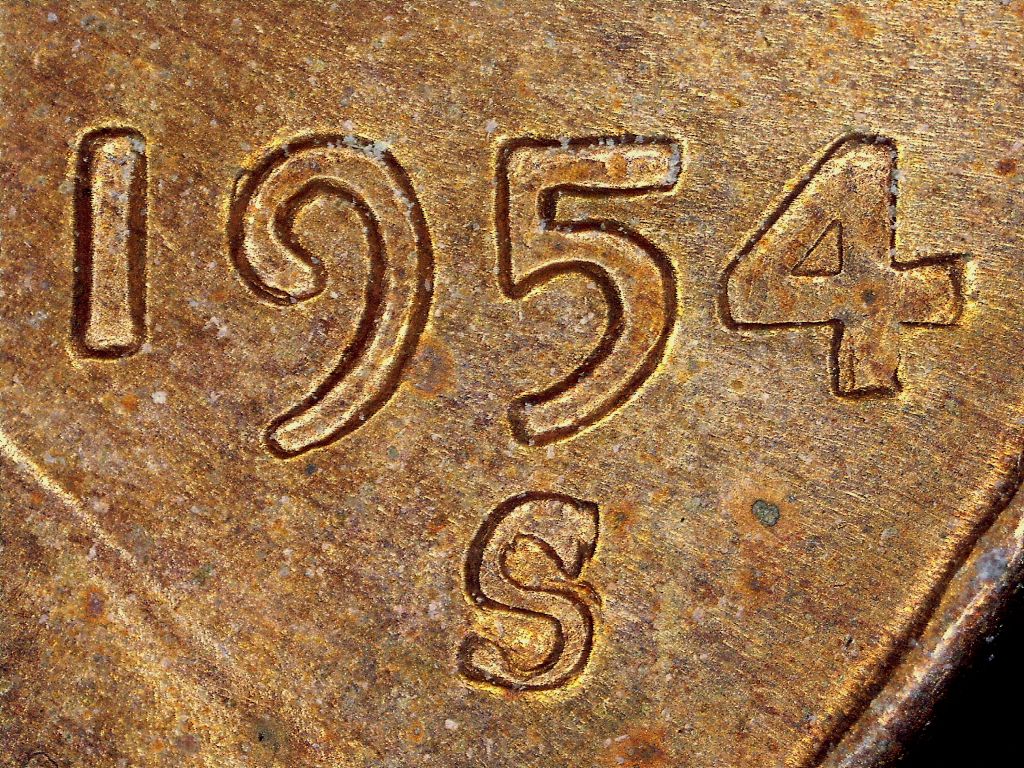


    I did discover another "trick" to make the scope work a little better...the automatic exposure has a "range" of exposure values before it changes its exposure settings. If you set the light level fairly high, and slowly reduce it, you'll find that the display will get gradually darker, then will brighten when it drops below the exposure threshold. To get best results, you can snap the shot "just before" the scope changes to the next setting. This avoids over-exposure and gives the best overall result.
    Builder of Custom Coin Photography Setups. PM me with your needs or visit http://macrocoins.com

    Comment

    • jfines69
      Member
      • Jun 2010
      • 28848

      #62
      That image isn't to bad... Still looks over sharpened but the details are still visible... Excellent job on that Ray... This is some thing that would work excellent for some one in the entry level of coins until they can get a better set up... Would be better if the scope was made with a removable piece and a longer mount post... Have you tried using the scope with any other software??? Some times a generic twain driver can make so called non compatible devices compatible with a wide range of software!!!
      Jim
      (A.K.A. Elmer Fudd) Be verwy verwy quiet... I'm hunting coins!!! Good Hunting!!!

      Comment

      • duece2seven
        Member
        • Feb 2013
        • 1567

        #63
        Originally posted by VAB2013
        Fingers are crossed! Ray you are so awesome to help us with this and take the time to answer my questions!

        That's another thing... that plastic piece is fixed on the Celestron but it is removable on some other microscopes. Well, if it breaks, it breaks... the money shot IS "the most important shot for any system to be able to reproduce" we can figure out what to do without that plastic piece.
        Ray, to remove the end cap I cut out a paper "disk" to cover the lights and sensor. Then I used a Dremel tool to cut off the cap. It definitely helps with range and lighting.

        As far as lighting goes, I've owned an older Celestron, an Andonstar, and 2 DinoLites. All 4 tend to yield overly red or golden images when using the Jansjo lights. After speaking with you and realizing the problem wasn't the lights but the scope itself, I switched over to the brighter, " whiter" Mainstays lamps and the situation improved. These things just don't take in the light like conventional cameras do nor do they adjust to post editing as well. Simply put you don't want to ask a USB scope to "think". My experience has taught me that if I can't achieve optimal color and brighteness before the shot, I'm very unlikely to achieve it post shot.

        You might try using one of your dual halogen lamps on this thing, Ray. I'd be really curious to see if that helps any. It just seems to me that brighter and whiter works better.

        Tracy

        Comment

        • VAB2013
          Forum Ambassador
          • Nov 2013
          • 12351

          #64
          We really need to find an alternative to photobucket! I have never seen so many ads in all my life! It's not photobucket anymore, it's "place your ad here"!!!

          ....still waiting for the pic to load

          Comment

          • VAB2013
            Forum Ambassador
            • Nov 2013
            • 12351

            #65
            Originally posted by ray_parkhurst
            A big pair of pliers broke the plastic skirt free without much damage. Now it goes on and off fairly easily.

            Removing the skirt allows the scope to get close enough for the Money Shot. It only needed another 5mm or so. Here is the same coin with on-board lighting, without the skirt:


            I did discover another "trick" to make the scope work a little better...the automatic exposure has a "range" of exposure values before it changes its exposure settings. If you set the light level fairly high, and slowly reduce it, you'll find that the display will get gradually darker, then will brighten when it drops below the exposure threshold. To get best results, you can snap the shot "just before" the scope changes to the next setting. This avoids over-exposure and gives the best overall result.
            That's it! Ray, that is a really nice money shot for a microscope under $100 bucks! We are so fortunate to have you test the Celestron and we really appreciate all of the time and expense you have invested into this endeavor! All of your findings and comments are very important and will be most helpful to those of us who decide to purchase the microscope! You have already done the hard part, that would take us hours and days to figure out! Thank you so much!

            Also, just so our members know, if you want something more than what this microscope will do, Ray is your guy!

            Comment

            • ray_parkhurst
              Paid Member

              • Dec 2011
              • 1855

              #66
              I'm glad to spend some time with the scope, coaxing the best images out of it I can. My assessment is that with a bit of work it's possible to get decent images from it. In summary, here are the "special" things I needed to do (besides the basics of focus/composition/levels adjustment) to achieve the above shot:
              1) Remove the clear plastic skirt. This is critical since with the skirt in place the above image is not possible from the scope
              2) Take a test shot of a white index card and adjust histogram color channels to give approximate white balance. Save the settings for application to each subsequent image
              3) "Darken" the shot by dimming the lights slightly, but not enough to cause the auto-exposure algorithm to set a slower exposure time
              4) Ensure the scope is set to 3MP (2048x1536) before snapping the shot
              5) Apply the test shot / white balance adjustments to the image
              6) Downsize the image to 1024x768 for publishing

              For the full-Cent image, I had to additionally do the following:
              7) Add tape to build up the diameter of the scope just above the clear skirt so the clamp can hold it in place
              8) Add an index card reflector, wrapped around the body of the scope and extending to within 1" of the coin

              I can explain any of the above further if you or others have questions.
              Builder of Custom Coin Photography Setups. PM me with your needs or visit http://macrocoins.com

              Comment

              • VAB2013
                Forum Ambassador
                • Nov 2013
                • 12351

                #67
                Originally posted by ray_parkhurst
                I'm glad to spend some time with the scope, coaxing the best images out of it I can. My assessment is that with a bit of work it's possible to get decent images from it. In summary, here are the "special" things I needed to do (besides the basics of focus/composition/levels adjustment) to achieve the above shot:
                1) Remove the clear plastic skirt. This is critical since with the skirt in place the above image is not possible from the scope
                2) Take a test shot of a white index card and adjust histogram color channels to give approximate white balance. Save the settings for application to each subsequent image
                3) "Darken" the shot by dimming the lights slightly, but not enough to cause the auto-exposure algorithm to set a slower exposure time
                4) Ensure the scope is set to 3MP (2048x1536) before snapping the shot
                5) Apply the test shot / white balance adjustments to the image
                6) Downsize the image to 1024x768 for publishing

                For the full-Cent image, I had to additionally do the following:
                7) Add tape to build up the diameter of the scope just above the clear skirt so the clamp can hold it in place
                8) Add an index card reflector, wrapped around the body of the scope and extending to within 1" of the coin

                I can explain any of the above further if you or others have questions.
                Awesome Ray! This is exactly what I was waiting for! I would like for Celestron Research & Development to see your suggestions and I will invite them to this thread in my next correspondence with Tyler in Technical Support.

                Ray, you know we will have more questions. We can't thank you enough for helping us and our hobby with your expertise in photography and applying your great knowledge to this product!
                Last edited by VAB2013; 10-14-2017, 08:24 PM.

                Comment

                • VAB2013
                  Forum Ambassador
                  • Nov 2013
                  • 12351

                  #68
                  Ray, please give me your website address. I am preparing an email to send to Celestron and I would like to give them your information as well.

                  Comment

                  • ray_parkhurst
                    Paid Member

                    • Dec 2011
                    • 1855

                    #69
                    It's www.macrocoins.com.
                    Builder of Custom Coin Photography Setups. PM me with your needs or visit http://macrocoins.com

                    Comment

                    • VAB2013
                      Forum Ambassador
                      • Nov 2013
                      • 12351

                      #70
                      Originally posted by ray_parkhurst
                      Great, thank you Ray! Email has been sent!

                      btw... I have been viewing your awesome website and looking at your incredible photos! I found one thing you will need to check on... this link, the photo is not working properly, or it's just my computer?

                      Comment

                      • jfines69
                        Member
                        • Jun 2010
                        • 28848

                        #71
                        Originally posted by VAB2013
                        Great, thank you Ray! Email has been sent!

                        btw... I have been viewing your awesome website and looking at your incredible photos! I found one thing you will need to check on... this link, the photo is not working properly, or it's just my computer?

                        http://www.macrocoins.com/1951d-bies.html
                        Not just you Vivien... It is small and real fuzzy or my coke bottles just went
                        Jim
                        (A.K.A. Elmer Fudd) Be verwy verwy quiet... I'm hunting coins!!! Good Hunting!!!

                        Comment

                        • VAB2013
                          Forum Ambassador
                          • Nov 2013
                          • 12351

                          #72
                          Thank you Jim, yep that's what it looks like to me too!

                          Comment

                          • ray_parkhurst
                            Paid Member

                            • Dec 2011
                            • 1855

                            #73
                            Ahh, that page is "under construction". I still need to image my 51-D BIEs.
                            Builder of Custom Coin Photography Setups. PM me with your needs or visit http://macrocoins.com

                            Comment

                            • VAB2013
                              Forum Ambassador
                              • Nov 2013
                              • 12351

                              #74
                              Originally posted by ray_parkhurst
                              Ahh, that page is "under construction". I still need to image my 51-D BIEs.
                              Okay, gotcha! Wow Ray, you helped us out and you still have work to do of your own! Thanks man.. we appreciate you!

                              Comment

                              • VAB2013
                                Forum Ambassador
                                • Nov 2013
                                • 12351

                                #75
                                At the direction of Tyler at Celestron, today I contacted Oceanside Photo & Telescope in Oceanside, California and was given Ginny's email address to find out the best way for our members to order the Celestron Handheld Digital Pro. Come to find out, Oceanside Photo & Telescope is Celestron's largest distributor! Here is OPT's info! https://optcorp.com/pages/about-opt-telescopes

                                Even better, Ginny and her husband are originally from Nashville, my home town! This is going to be a fun endeavor!
                                Last edited by VAB2013; 10-20-2017, 06:08 PM.

                                Comment

                                Working...