You are currently viewing our boards as a guest which gives you limited access to view most discussions and access our other features. By joining our community you will have access to post topics, communicate privately with other members, respond to polls, upload content and access many other special features.
For more information on registration and an upgrade to Paid and Premium Memberships go to our Membership page and join our community today!
If you have any problems with the registration process or your account login, please contact contact us.
If this is your first visit, be sure to
check out the FAQ by clicking the
link above. You may have to register
before you can post: click the register link above to proceed. To start viewing messages,
select the forum that you want to visit from the selection below.
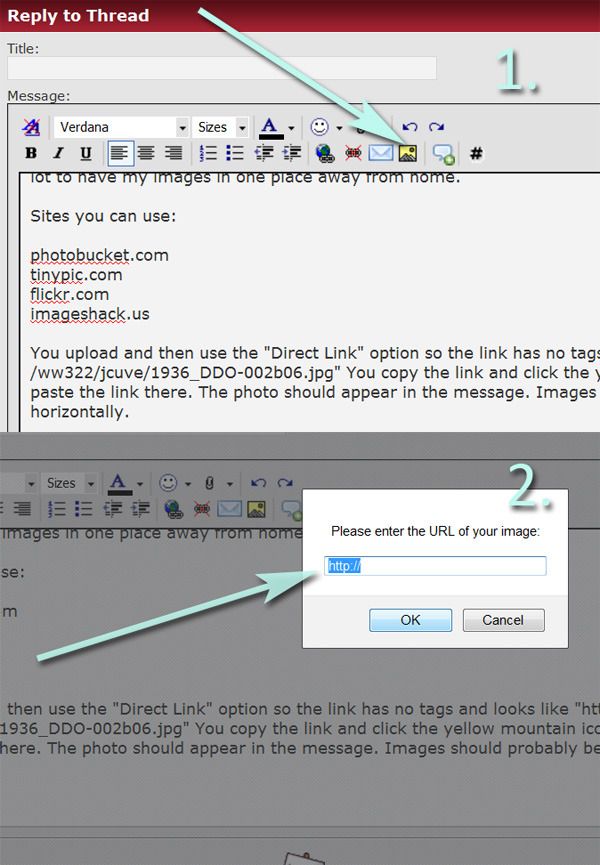
Ok this is a silly question to most of you here , but how do I upload an image? Do i need to put it on some website somewhere first? Is so what is the best site to use. I guess I should have figured this out a while ago but just got my camera and have some pictures to post.
When creating a post before you submit it, scroll down and select manage attachments then you can browse your computer photos or select a url photo then you can preview and or submit your post with a photo. When you select upload it may take a few seconds. Close that window then submit your post.


 Tweet
Tweet



 Rollem
Comment