You are currently viewing our boards as a guest which gives you limited access to view most discussions and access our other features. By joining our community you will have access to post topics, communicate privately with other members, respond to polls, upload content and access many other special features.
For more information on registration and an upgrade to Paid and Premium Memberships go to our Membership page and join our community today!
If you have any problems with the registration process or your account login, please contact contact us.
If this is your first visit, be sure to
check out the FAQ by clicking the
link above. You may have to register
before you can post: click the register link above to proceed. To start viewing messages,
select the forum that you want to visit from the selection below.
I did not believe the Nikon rep. I think he knew not of what he spoke. It is my understanding also that the camera needs to have live view capability to get the pre-shot on the screen. Yours does have the live view. Do you have the on-screen focus capability?
I suppose, in a thread this large, with so many (great) examples, it wouldn't hurt if these images were maybe 500 pixels across horizontally. I have enjoyed it. I'm a an artist and photographer but the images are rather large.
I've seen folks posting on this forum using thumbnails. Can I link to an outside service (I'm using photobucket for now) and have thumbnails for the images?
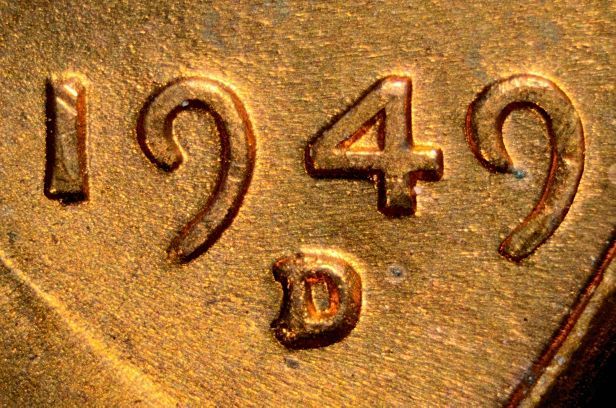
Unfortunately the point of these exercises is to see the image quality, so bigger is better. First few photos were of a whole coin, so could be cropped to 800x800 and that seemed to be OK with folks. It's when I posted the variety photos at 1232x816 that folks started having issues. I'll keep the images to 800x800 max for future posts, and if I do a variety shot I'll make it 616x408. Unless someone can tell me how to do thumbnails with photobucket...Ray
Builder of Custom Coin Photography Setups. PM me with your needs or visit http://macrocoins.com
The 800 in width will keep us within the boundaries Ray..I know nothing about thumbnails,but this great stuff and I don't want to take away from it either... thanks !
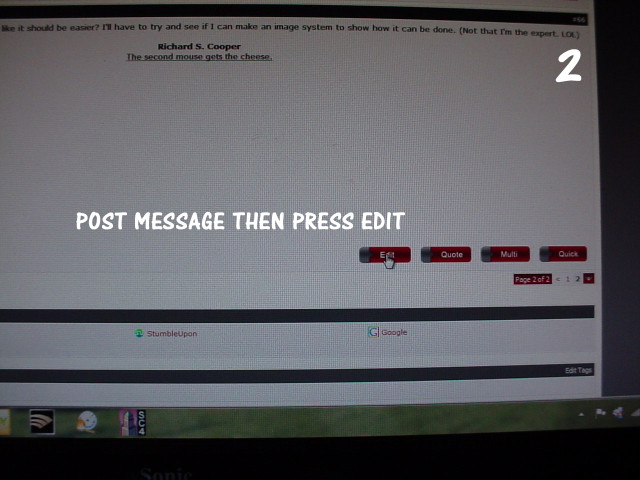
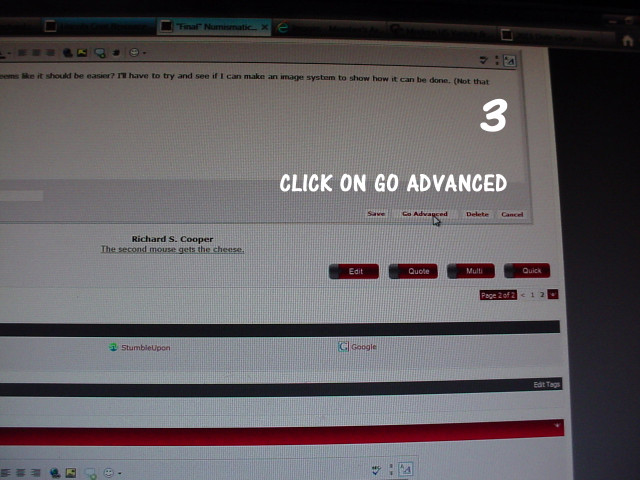
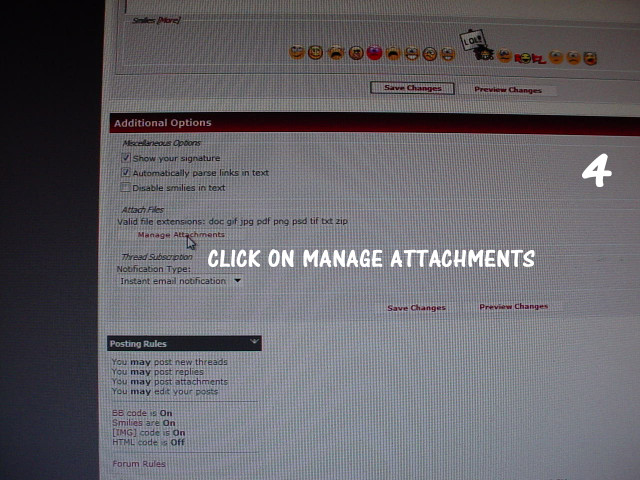
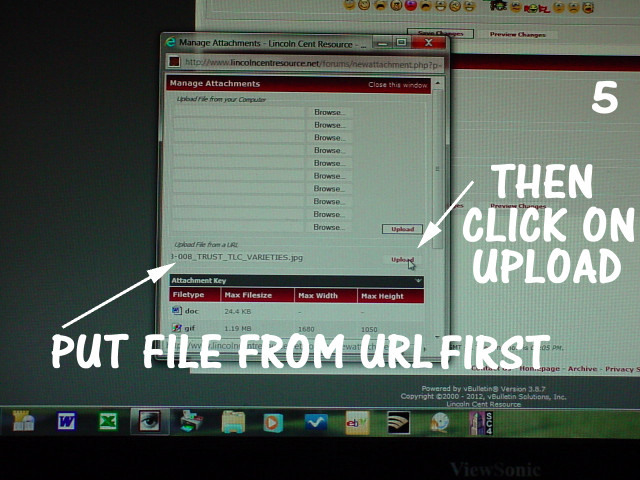
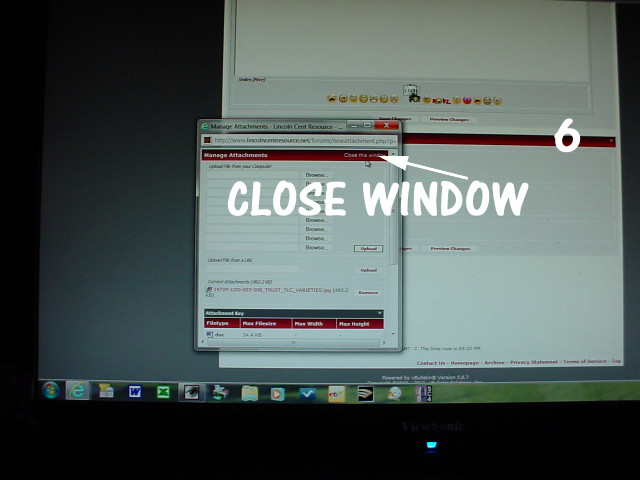
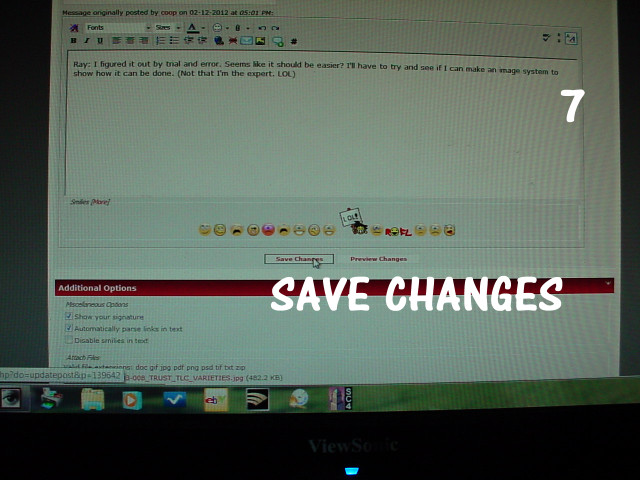
Ray: I figured it out by trial and error. Seems like it should be easier? I'll have to try and see if I can make an image system to show how it can be done. (Not that I'm the expert. LOL)
Last edited by coop; 02-12-2012, 05:40 PM.
Reason: ADDED thumbnail posting info.
Richard S. Cooper Some have asked about my images I use, and I'm glad to say I've completed a DVD of these. Ask if you are interested. Newer members like these.
Most DLSR's work in conjunction with the lens they are using to take the pictures. When you use the camera body and attach it to a part that really gives no feadback to the camera and just lets it sit on top of the scope, it just does not do it.
Also using the canon EOS utility similar to the nikon utility, taking pics with my scope and camera together, I found getting them to match up, again what I saw on the computer screen was not the final result after taking the pic in many cases.
I have no problem at all with my scope setup. Heres an example that I took with my scope.
btw, when you click on the thumbnail, it goes to a bigger picture with black surrounding. When you click on that, it opens in a separate window. In most cases you can even click on THAT pic to go to its original size
I did not believe the Nikon rep. I think he knew not of what he spoke. It is my understanding also that the camera needs to have live view capability to get the pre-shot on the screen. Yours does have the live view. Do you have the on-screen focus capability?
Yes, and I use it extensively. I own a D5000 and it also has Live View capability. In fact I got just as good image quality out of the D5000 as I do from the D7000, though the D7000 has a "crisper" Live View so it's easier to critically focus...Ray
Builder of Custom Coin Photography Setups. PM me with your needs or visit http://macrocoins.com
I only use photobucket to host the images, not to edit them. I just use Nikon ViewNX/NX2 to do my RAW processing, jpg conversions, downsizing and cropping then upload the final image to photobucket for hosting...Ray
Builder of Custom Coin Photography Setups. PM me with your needs or visit http://macrocoins.com
[QUOTE=kloccwork419;139646]I have no problem at all with my scope setup. Heres an example that I took with my scope.
I get the same pics you do but just like yours, the light source causes shadows to appear and also give the coins some lines it really does not have or makes you believe you have something you don't. I guess you have to look at Ray's shots and then look for shadows versus what we put up. Not making it a negative using the scope for pics because your 1962 looks very good but it is not giving a completely accurate view. That's why I was getting so frustrated taking pics with my camera attached to the scope. It is very hard to master the scope with a light source that will give you what a bellows or tube gives you.
Here is a scope pic with hard control of the lighting:
And here is one where I used tubes, versus bellows which I am going to use moving forward, but you can see the way the light changes to a non-glare of sorts but you get to see any type of variance on the coin surface much better if it were there.
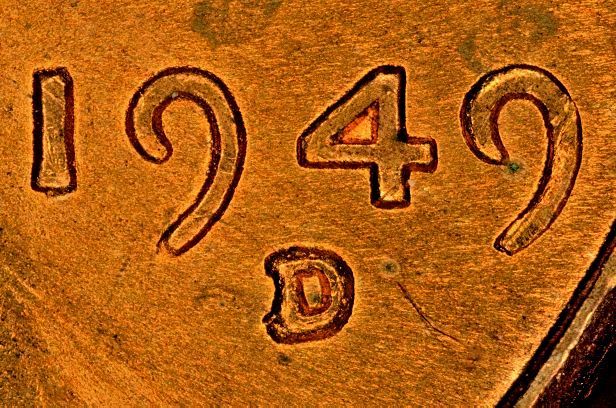
Here's the same coin shot with a 50mm f2.8 EL-Nikkor at f4. The lens is not sharp at f2.8. At f4 this image needed a 2-image stack. I am showing it at 616x408 pixels by request to downsize things a bit.
Builder of Custom Coin Photography Setups. PM me with your needs or visit http://macrocoins.com
It looks to me like you need to do some stacking of the image. The sharpness of the in-focus areas is good, but the depth of field of the microscope is not sufficient to give a critically-sharp image. This is actually a good thing, indicating the microscope is capable of reasonably high resolution. Probably if you take another shot focused on the field, the stack would come out very nice...Ray
[QUOTE=Amadauss;139665]
Originally posted by kloccwork419
I have no problem at all with my scope setup. Heres an example that I took with my scope.
I get the same pics you do but just like yours, the light source causes shadows to appear and also give the coins some lines it really does not have or makes you believe you have something you don't. I guess you have to look at Ray's shots and then look for shadows versus what we put up. Not making it a negative using the scope for pics because your 1962 looks very good but it is not giving a completely accurate view. That's why I was getting so frustrated taking pics with my camera attached to the scope. It is very hard to master the scope with a light source that will give you what a bellows or tube gives you.
Here is a scope pic with hard control of the lighting:
And here is one where I used tubes, versus bellows which I am going to use moving forward, but you can see the way the light changes to a non-glare of sorts but you get to see any type of variance on the coin surface much better if it were there.
Builder of Custom Coin Photography Setups. PM me with your needs or visit http://macrocoins.com
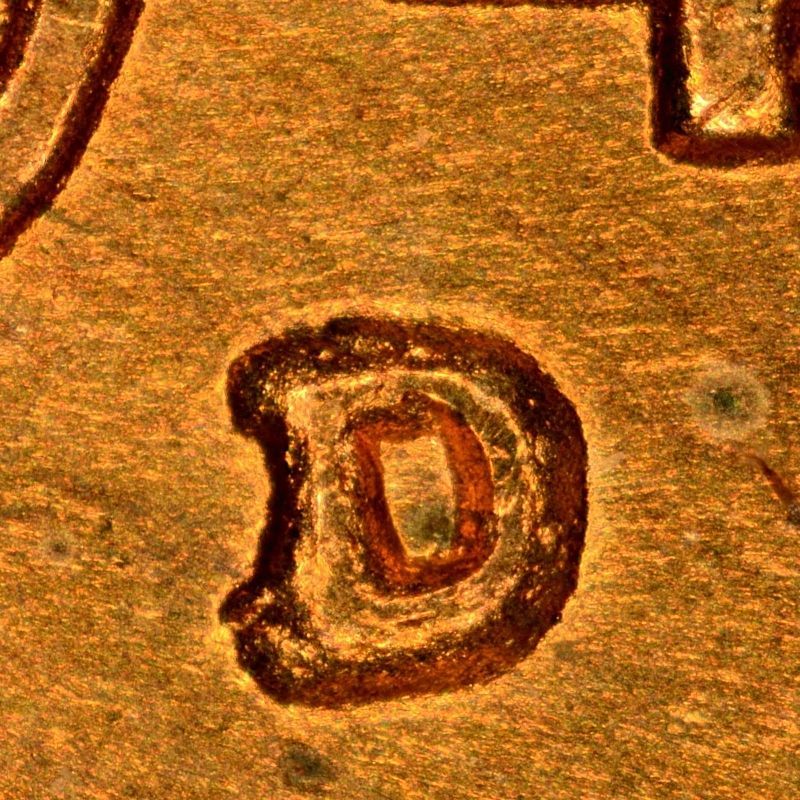
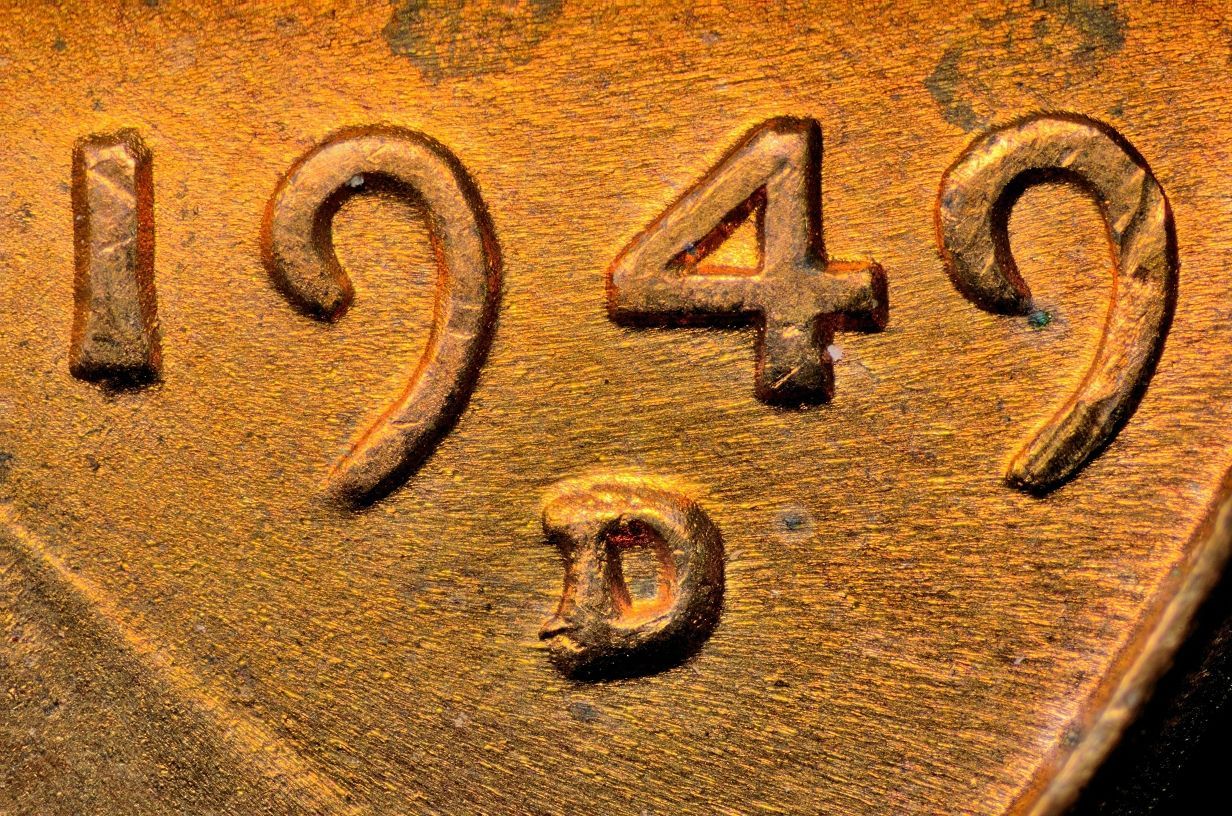
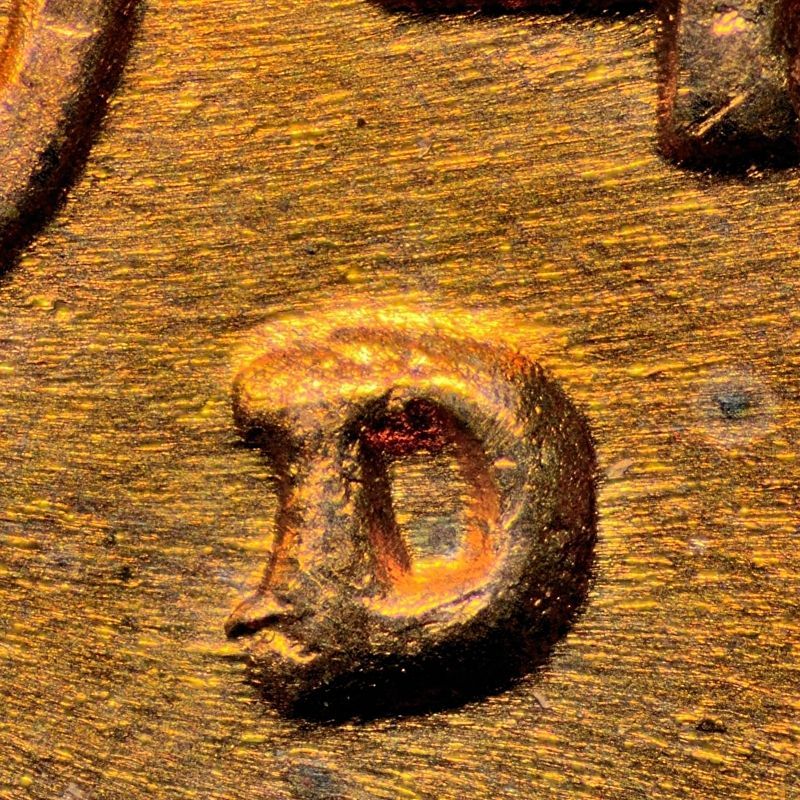
I just got some new glass yesterday and decided to try it out for this thread. Here's the view at 4x, and below that is a 1600x1600 crop downsized to 800x800. Sorry for the large image size, I just couldn't help myself. Anyone care to guess what this was taken with?
Builder of Custom Coin Photography Setups. PM me with your needs or visit http://macrocoins.com


 Tweet
Tweet


Comment